Website powered by

My recent sketches and WIPs

Work In Progress / 15 October 2023

This one is a character I created based on the Na`Vi people of Pandora (Avatar movie). However it is a mixed species of feline and sapien: Bigger chest, narrowed & broader shoulders, stronger neck, broader pects, slender and stronger front limbs. Quadrupedal and bipedal.


DCeased Batman:


Sylvanas Windrunner (Warcraft game) from Sculpt Off event (10-hour sculpt).


My take of Mirko from My Hero Academia (8hour sculpt):


Mokey sculpt, concept from https://www.instagram.com/koteriink/


A Discord server to share my knowledge (Regarding 3D character & anatomy)

News / 01 October 2023

My dear fellas,

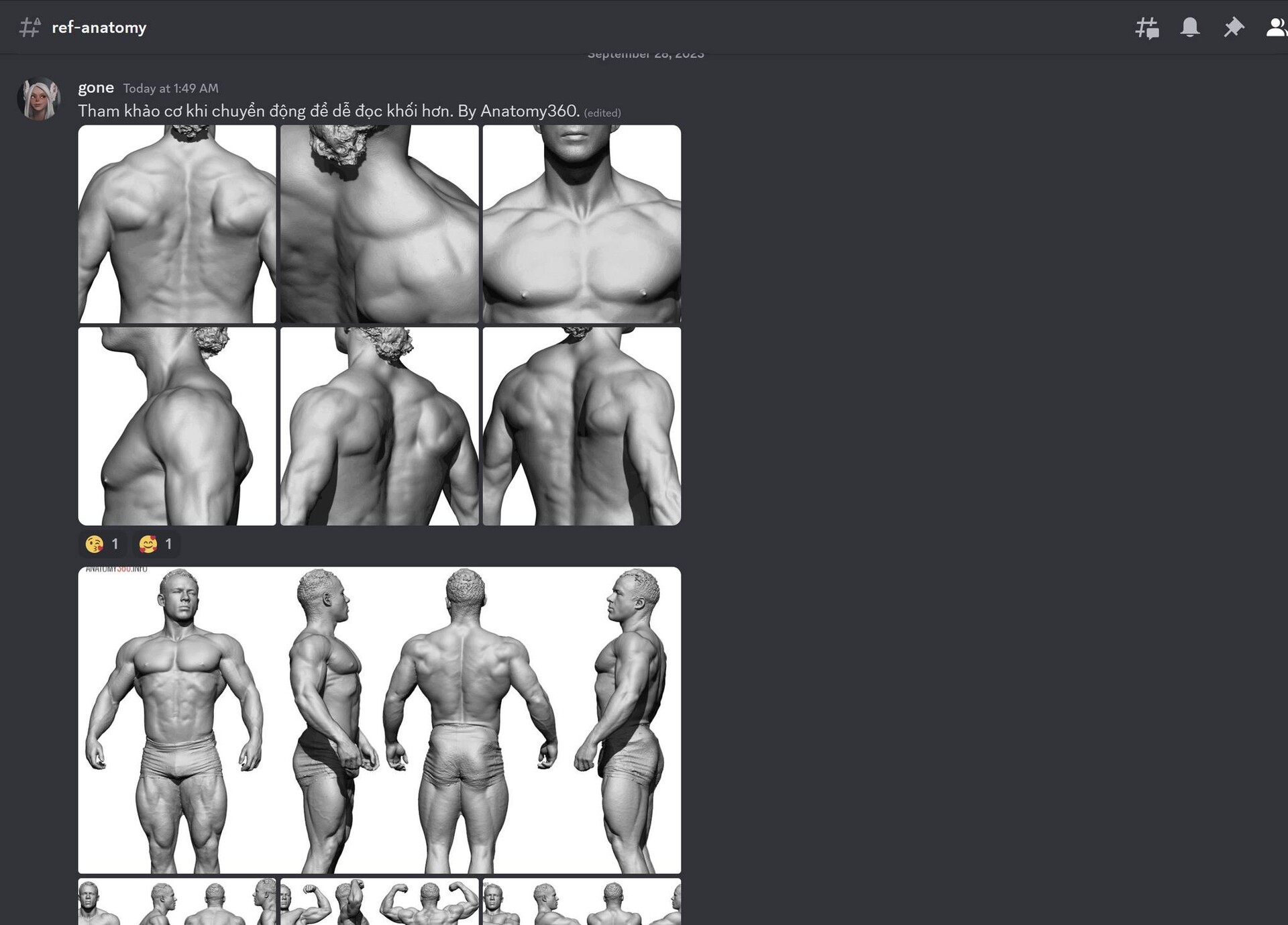
I just created a Discord server (which I used to teach 3D courses), but now I'm gonna use to it to share my knowledge, reference videos and pictures regarding general anatomy,  ZBrush sculpting, modeling and other 3D-related stuff.

You can also send my questions to ask about 3D characters, game, modeling, sculpting, 3D printing... and I will try to answer everything in my free time.

Lastly, this is where I stream my sculpting/drawing sessions. I hope this will encourage me as a lazy ass sculptor; and encourage you guys to learn and make amazing 3D characters.

And EVERYTHING IS FREE!

Link Discord: https://discord.gg/nfY5T7NNe9

The server is currently in Vietnamese but I will try to add English translation to every post.


Some Maya tips

General / 01 March 2022

Set this to RAW to save time.


Always use AUTOSAVING.


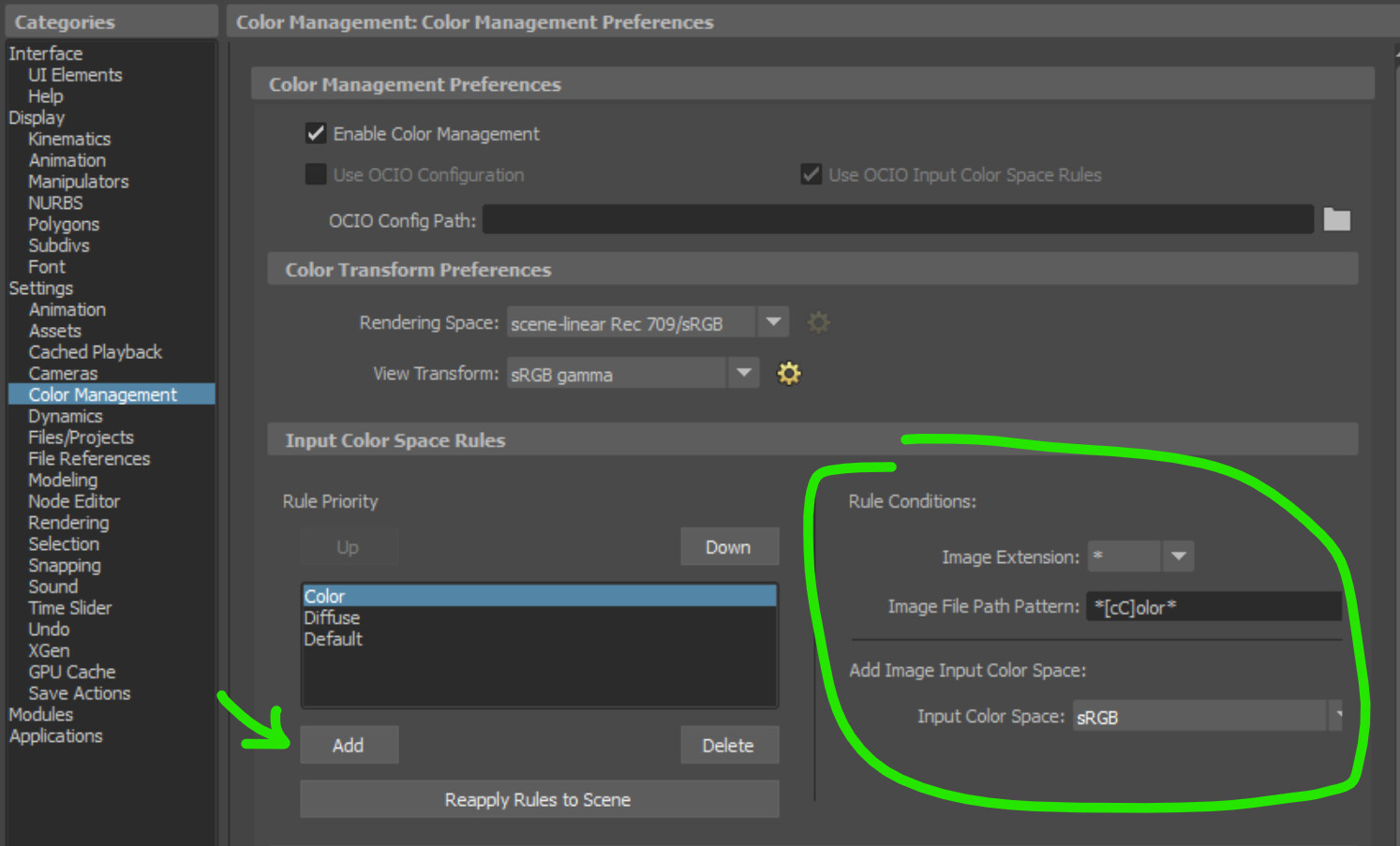
Tired of setting the color space manually every time you load a non-linear texture map (Diffuse/Base Color)? Set the rules in Maya settings as below.


I'm switching to OCIO and ACES cuz sRGB sucks!

Article / 01 March 2022

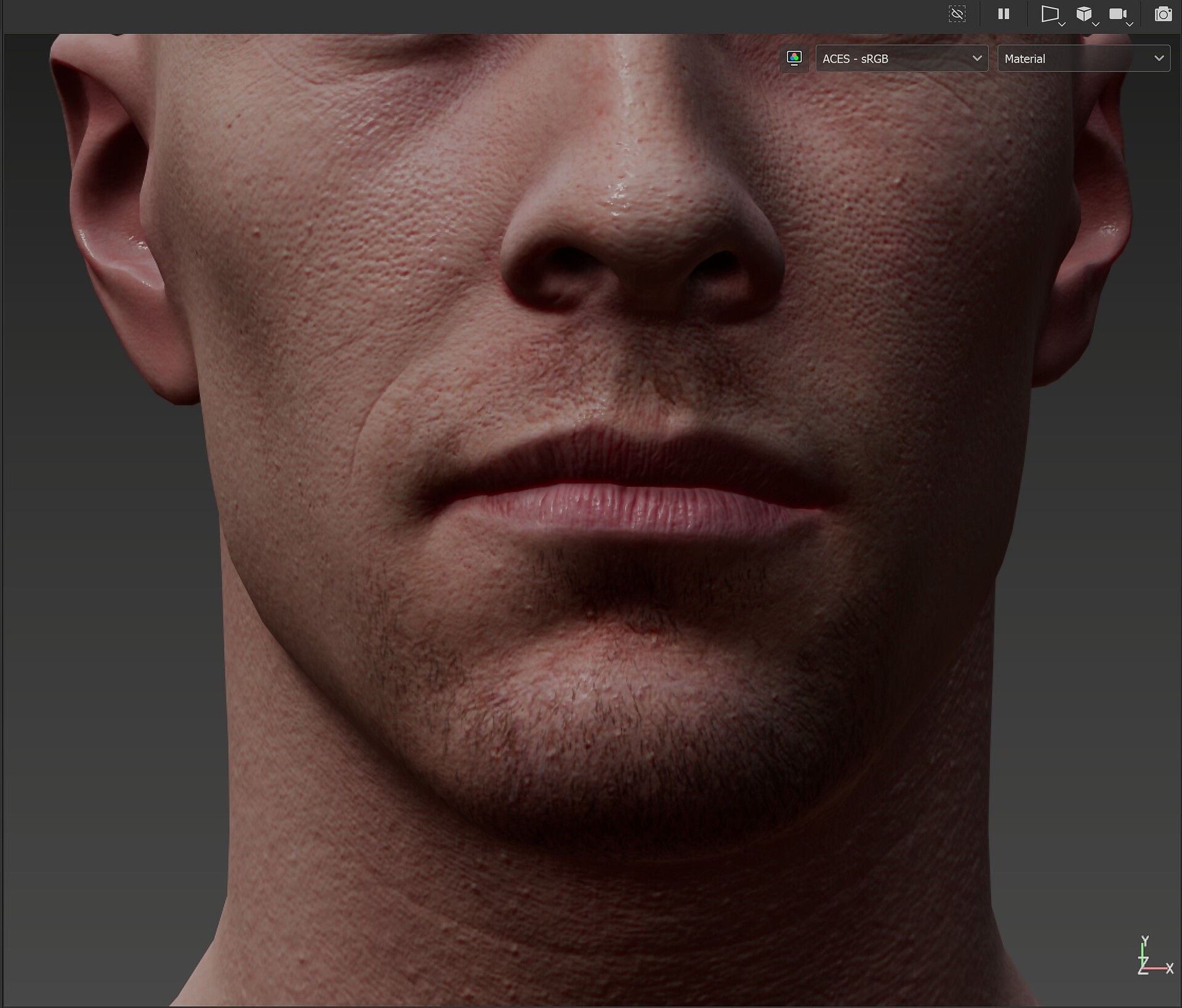
I'm occasionally switching to OCIO color management workflow with ACES view config. ACES has a very nice tone mapping except the hue shift at high saturation so I hope they will do something about it. I was skeptical about using ACES but I think it's time for a change since sRGB sucks (~30%-ish color coverage mehh).


More information about ACES: 

https://www.oscars.org/science-technology/sci-tech-projects/aces

https://acescentral.com/

Well-written (and long) articles with everything you should know about ACES: 

https://chrisbrejon.com/cg-cinematography/chapter-1-5-academy-color-encoding-system-aces/

https://www.toadstorm.com/blog/?p=694

https://greyscalegorilla.com/c4d-artists-aces-color/

https://garagefarm.net/blog/what-is-color-space-and-why-you-should-use-aces

https://acescolorspace.com/


Best image viewer for CG Artist?

Article / 01 March 2022

In searching of the best image viewer for CG Artists, I've been stumbled upon countless (or maybe not) softwares and windows apps, and uninstalled most of them. (ACDSee for the nostalgia, reliable Google Picasa, ImageGlass, IrfanView, XnView and a lot of Windows Store Apps).


My needs for a good image viewer?

- Must support TGA, PSD, EXR, TIF. Optionally HDR, SVG and other stuff.

- Should be fast enough while browsing and zooming.

- Color manageable.

- Simple interface with minimal amount of buttons.

- Hotkeys should be configurable.

- Open-source is a plus.


I've been using Google Picasa for a few years and it's no doubt the best image viewer for Windows: fast, nice interface, supports a lot of formats. But (yes, always a but), Google decided to abandon Picasa for some unknown reasons and there's nothing I can do about it.


I can still install the old Picasa 3.9 from the setup file I still have in my SSD, but with the lack of development and scaling issue in newer Windows versions, I decided to stop using it.


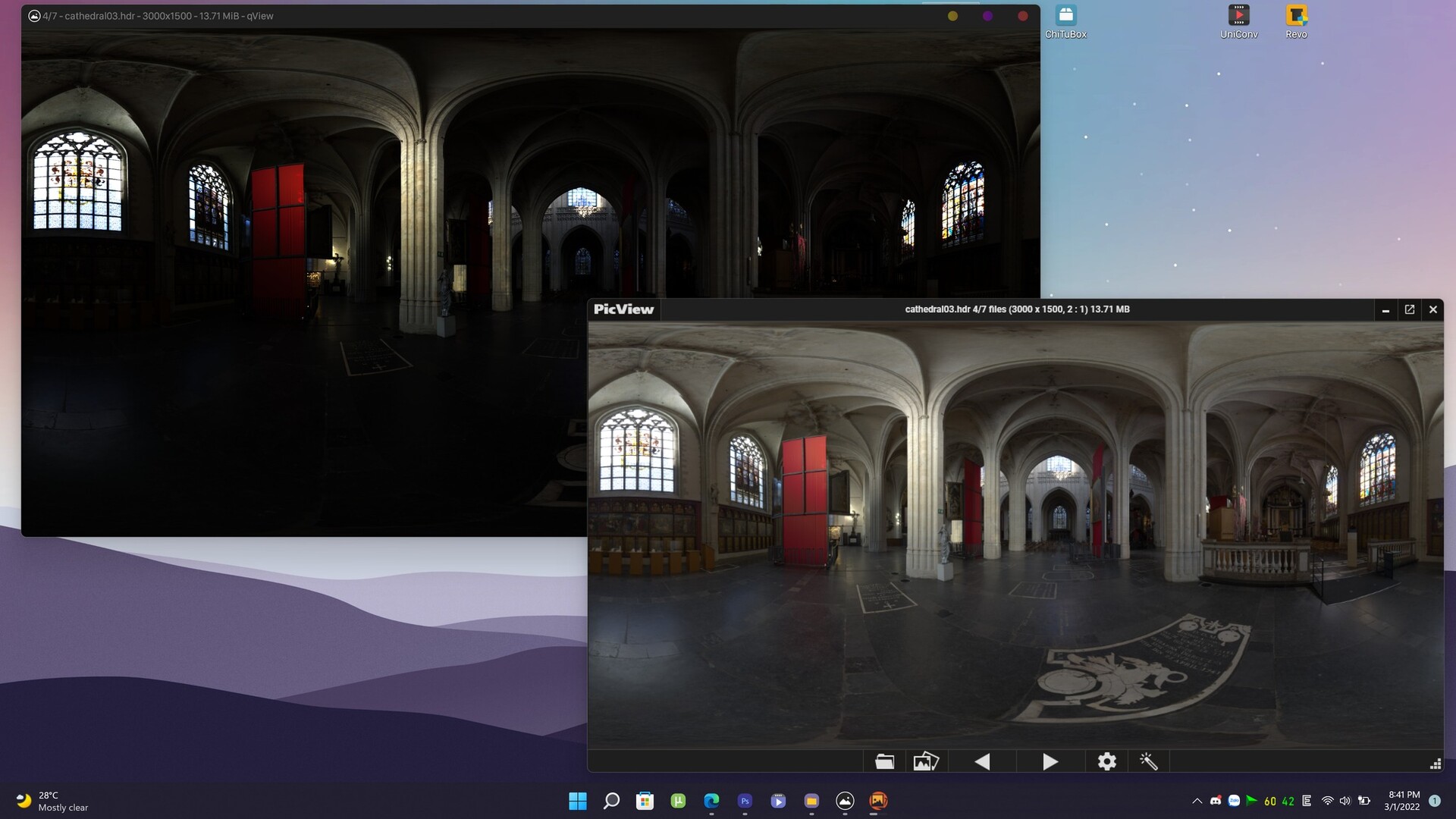
So here are the best ones I found so far: qView (https://interversehq.com/qview/)

It's open source, multi-platform, fast and supports many formats. The only downside is non-configurable color management and non-existence wide gamut (HDR) tone mapping. But I have another software to open HDR files: LizardQ Viewer which supports panoramic view and HDR tone mapping.

The 2nd choice should be PicView (https://picview.org/)

This open source software is crazily fast, like Quicksilver or The Flash on steroid. I can open a 200mb 16bit EXR file in 1 or 2 seconds. It also has a very consistent HDR tone mapping, which is nice for HDR preview. But the interface is a bit clumsy with some glitches when resizing windows. It's still a solid choice.

Pictureflect Photo Viewer (https://pictureflect.com/) is another good choice with a very customizable option page. But the lack of some image format support had me uninstall it. You can still use it for normal image viewing, a very solid Windows Store App (which means no messy files, and auto-update from the Store).

Others softwares I mentioned in the first paragraph are non-comparable, so just get rid of them.

---

TL:DR: If you need a good image viewer. Install qView and forget the rest.

#cg #color #imageviewer #software #3d #artist 

ZBrush Realtime Viewport Anti-Aliasing v1.3 now supports hi-res monitors with Windows Scaling

News / 03 July 2021

Yo fellas,

I just updated my Realtime Viewport Anti-Aliasing script to version 1.3 to support hi-res monitors with Windows Scaling on.

Anyone who bought the script will receive this update for FREE.

The issue is I used to use a 34" ultrawide monitor, and when I switched to my laptop with an UHD 17" screen, I had to turn on Windows Scaling to effectively see those tiny things. However, v1.2 script didn't work as intended, it would turn on AA 2 times when it supposed to turn it off.

I fixed it in this v1.3 update.

Compare this script to others you find on the internet? You only need ONE button to turn it on/off while preserving model position on the canvas. Voila!

You can get the script here:

https://poligone.artstation.com/store/15xR/zbrush-realtime-viewport-anti-aliasing

Happy sculpting!

Facial Hair Tool v2.0 now supports 4K & Real-world scaling

News / 29 April 2021


For anyone who had scaling issues with my Facial Hair Tool, here's a good news: I just updated the tool to v2.0, now supports real-world scaling AND 4k texture maps (2k in previous version).


If you purchased the tool, it's a FREE update. You can go to where you purchased (ArtStation, Gumroad, FlippedNormals...) and download it.
Have fun!


-----
Regarding 1-star reviews, I acknowledged it and there are some people who had the issues as stated above. But, it's less than 10 on thousands purchases and you know, people tends to leave bad review when things turned sideway.


So if you purchased my tools and liked it, please leave a review. I'm appreciated.


https://poligone.artstation.com/store/jrXO/poligone-facial-hair-tool-for-substance-painter


Kobe Bryant 3D printing process

Making Of / 08 September 2020

3D printing process. So I’m getting familiar to Anycubic resin’s shrinkage and this is the first time I success on the first print.

There are some properties of resin such as viscosity, curing time and shrinkage and it takes time to learn those by print it yourself a lot.

For example when I make the keys and cut in ZBrush, I inflate the keys before boolean, so there is tolerance. It makes it easier to fit parts onto each others.


Btw my printer is Anycubic Photon 1st gen (I call it the OG Photon). The build plate is pretty small (aprox 6x9x15cm) so this statue is scaled to 80% of 1/6th scale.


Anycubic just released the Mono X which looks promising with 4k screen, bigger build area and faster curing time. I’m planning to buy one but there is some issue reported by users, so I will wait a bit.


Next time I will share more about file preparation, slicing and printing. Peace. 


[UPDATE] ZBrush Viewport Anti-Aliasing v1.2 and Non-Destructive SubDivisions v1.2

News / 26 August 2020


CHANGELOG:
v1.1: Toggling AA will never move or zoom into your mesh, maintaining the original position on the canvas.
v1.2: Combine two macros into a single button. Easy On/Off.

AVAILABLE AT:
https://poligone.art/store/15xR/zbrush-realtime-viewport-anti-aliasing


CHANGELOG:
v1.1: Update to a faster script.
v1.2: Got rid of unnecessary undo history. No more multiple undo steps.
AVAILABLE AT:
https://poligone.art/store/xMLm/zbrush-non-destructive-subdivisions 

ZBrush Viewport Anti-Aliasing and Non-Destructive SubDivisions

News / 25 August 2020

Hi fellas,

Poligone here. Today I want to show you two useful macros that I've made and been using for a while.

Poligone - ZBrush Realtime Viewport Anti-Aliasing

These macros will enable/disable AA for better real-time rendering, especially for quick viewport screenshots. Works best for hair and thin objects. Note that enabling AA will heavily affect ZBrush performance so don't use it when sculpting.


Buy now at: https://gum.co/zbrushAA


Poligone - ZBrush Non-Destructive SubDivisions

ZBrush default subdivisions will smooth out your mesh (which led to detail loss), and shrink your mesh (especialy at the edge) so your low-res and hi-res mesh won't match.

This macro will let you subdivide your ZBrush mesh the alternative way which will reduce shrinkage and preserve details of your mesh.

It is good for organic meshes such as humanoid and creatures (soft edges), and will produce artifacts if used on hard-surface meshes. Use with caution.


Buy now at: https://gum.co/ZBNDSub


You can buy these macros at my Gumroad store or ArtStation store in the links below.

www.poligone.art/store
www.gumroad.com/poligone

I hope you find these macros useful. Happy sculpting!

Best,
Poligone.